Big O Notation
August 31, 2026 · 11 min read · Angelos Ioakeimidis
- Big O Notation: Why Code’s Growing Pains Actually Matter
- Complexity Affects Efficiency (Shocking, I Know)
- Measuring the Growth Factor
- Big O Notation: The Rules
- Putting the Rules Into Practice
- Time Complexity, for Real This Time
- Space Complexity: The Memory Side of the Story
- The Key Things I Try to Remember
Big O Notation: Why Code’s Growing Pains Actually Matter
Have you ever written a function that worked perfectly fine on your test data, shipped it, and then watched it crawl to a halt the moment real users showed up with real amounts of data? Yeah, me too. That’s basically the entire reason Big O notation exists, and once it clicked for me, I couldn’t unsee it in every piece of code I write.
So let’s talk about it. Not in a dry, textbook way, but in the way I wish someone had explained it to me the first time.
Complexity Affects Efficiency (Shocking, I Know)
When we talk about complexity in the Big O world, we’re really talking about two things: time and space. Time complexity is how many operations your code needs to perform in the worst case scenario. Space complexity is how much extra memory it needs to allocate, also in the worst case. That’s it. That’s the whole idea. Everything else is just details.
Measuring the Growth Factor
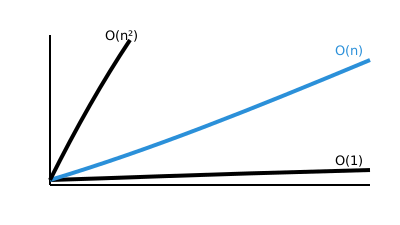
Here’s the thing that took me a while to internalize: Big O isn’t about counting exact operations. It’s about how your algorithm’s workload grows as your input grows. Picture a chart with input size on the x-axis and number of operations on the y-axis. Some lines stay flat. Some curve up gently. Some shoot up like they’re trying to escape the graph entirely. That’s your growth factor, visualized.
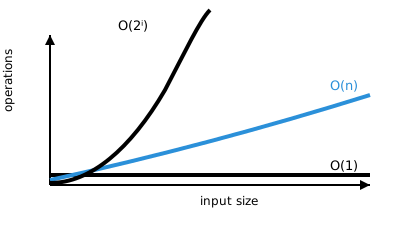
Here’s the lineup, from best to worst:
| Class | Name | What it looks like |
|---|---|---|
O(1)
|
Constant Time | No loops, or loops that never grow past a fixed size. Doesn't matter if your input has 10 items or 10 million, the work stays the same. |
O(log n)
|
Logarithmic Time | This one only works on sorted data, and you'll see it a lot in tree traversals, like Binary Search. |
O(n)
|
Linear Time | The classic for-loop or while-loop marching through n items, one at a time. |
O(n log n)
|
Linearithmic Time | Very common in sorting algorithms. Think of it as "do a linear pass, but do it log n times." |
O(n²)
|
Quadratic Time | Every element gets compared to every other element. Usually two nested loops. This is where things start getting uncomfortable. |
O(n^c)
|
Polynomial Time | Nested loops where each one visits all the elements. The runtime becomes O(n raised to however many levels of nesting you've got). |
O(2^n)
|
Exponential Time |
Recursive algorithms solving a problem of size n, where the work doubles
with every additional element.
|
O(n!)
|
Factorial Time | You're basically adding a whole new loop for every single element. This is the one that keeps computer scientists up at night. |
Why does any of this matter? Because the difference between O(n) and O(n²) might look small on paper, but at scale it’s the difference between your app responding instantly and your app timing out while your users angrily refresh the page.
O(1) is the fastest complexity class there is - if you want to see it proven with real code and understand exactly why it never slows down. Read O(1): Constant Time →
Big O Notation: The Rules
There are four rules I keep coming back to whenever I’m figuring out the Big O of something I’ve written.
Rule 1: Drop the Constants
Constants get replaced with the number 1, because they don’t matter once your input gets big enough.
function printSingleElementAndPrintHi100Times(items) {
  console.log(items[0]) // O(1)

  for (let i = 0; i < 100; i++) {
    // O(100)
    console.log('hi')
  }
}

// O(1 + 100) = O(101) => O(1)
100 iterations sounds like a lot until you realize it’s still a fixed number, no matter what you pass in. Constant is constant.
Rule 2: We’re Usually Talking About the Worst Case
function contains(haystack, needle) {
  // Does the haystack contain the needle?
  for (let i = 0; i < haystack.length; i++) {
    // O(n)
    if (haystack[i] === needle) return true
  }
  return false
}

// O(n)
Sure, the needle might be sitting right at index 0, and you’d return after a single check. But would you bet your app’s performance on always getting lucky? I wouldn’t. So we plan for the worst case: O(n). Best case here is technically O(1), but unless you say otherwise, worst case is what’s implied.
Rule 3: Different Terms for Different Inputs
When two inputs are genuinely different things, give them different variables. Use a plus sign for steps that happen in sequence, and a multiplication sign for steps that are nested.
function compressBoxesTwice(boxes, boxes2) {
  boxes.forEach((box) => console.log(box)) // O(n)
  boxes2.forEach((box2) => console.log(box2)) // O(m)
}
// These happen in order: O(n + m)
But nest them, and the math changes completely:
function compressBoxTwice(boxes, boxes2) {
  boxes.forEach((box) => {
    // O(n)
    console.log(box)
    boxes2.forEach((box2) => console.log(box2)) // O(m)
  })
}
// Nested loops: O(n * m)
Same function name, wildly different growth pattern. Sneaky, right?
Rule 4: Certain Terms Dominate Others
When you add complexities together, the biggest one wins and swallows the rest. Here’s the pecking order:
O(1) < O(log n) < O(n) < O(n log n) < O(n²) < O(2^n) < O(n!)function printAllNumbersThenAllPairSums(numbers) {
console.log('these are the numbers:')
numbers.forEach((number) => {
// O(n)
console.log(number)
})
console.log('and these are their sums:')
numbers.forEach((firstNumber) => {
// O(n)
numbers.forEach((secondNumber) => {
// O(n)
console.log(firstNumber + secondNumber)
})
})
}
// O(n + (n * n)) = O(n + n²) => O(n²)Putting the Rules Into Practice
Let’s run through a slightly meatier example and apply all four rules at once:
function printFirstItemThenFirstHalfThenSayHi100Times(items) {
  console.log(items[0]) // O(1)

  const middleIndex = Math.floor(items.length / 2) // O(1)
  let index = 0 // O(1)

  while (index < middleIndex) {
    // O(n/2)
    console.log(items[index])
    index++
  }

  for (let i = 0; i < 100; i++) {
    // O(100)
    console.log('hi')
  }
}
// O( 1 + 1 + 1 + n/2 + 100) = O(n/2 + 103) = O(n/2) => O(n)
Drop the constants, simplify the fraction, and you’re left with plain old O(n). Isn’t it kind of satisfying how all that mess boils down to one clean answer?
Time Complexity, for Real This Time
Here’s something I had to correct myself on early: time complexity is not a stopwatch measurement. It has nothing to do with how many milliseconds your code takes to run on your particular laptop. It’s about how many operations get performed in the worst case, expressed as a function of input size n. That’s why Big O works the same whether you’re running on a decade-old server or the beefiest machine money can buy.
Let’s calculate it for real:
/**
 * Get the smallest number in an array of numbers
 * @param {Array} n array of numbers
 */
function getMin(n) {
  const array = Array.from(n) // Line 6: 1 operation
  let min // Line 7: 1 operation

  array.forEach((element) => {
    // Line 9: loop runs n times
    if (min === undefined || element < min) {
      // Line 10: 1 operation
      min = element // Line 11: worst case, 1 operation every time
    }
  })
  return min // Line 14: 1 operation
}
Assuming every line takes roughly the same amount of CPU time, we’ve got 3 operations outside the loop and 2 operations inside it, and the loop runs n times. That gives us 2n + 3. Drop the constant, and we’re back to our old friend O(n).
Space Complexity: The Memory Side of the Story
Time isn’t the only resource on the table. Space complexity asks a different question: how much additional memory does your function need to allocate, in the worst case? Notice I said additional. We generally don’t count the input itself, since that’s not something we control. We only care about what our function creates on top of it.
Space complexity gets caused by things like variables, data structures, function calls, and general allocations.
function arrayOfHiNTimes(n) {
  const hiArray = [] // this is additional space we're creating
  for (let i = 0; i < n; i++) {
    hiArray[i] = 'hi'
  }

  return hiArray
}
Every call to this function builds a new array of size n. That’s O(n) space, plain and simple.
The Key Things I Try to Remember
If I had to boil this whole topic down to the essentials, here’s what I keep in my back pocket:
| Concept | What it means |
|---|---|
| Complexity | Measures how efficient an algorithm is, and it comes in three flavors: worst-case (say, input already in reverse order), best-case (already sorted), and average-case (elements in random order). Realistically, worst-case is the one we care about most. Hope for the best, plan for the worst. |
| Time complexity | Isn't a literal timer. It's the count of operations needed in the worst case, and it's driven by things like arithmetic operations, comparisons, loops, and outside function calls. |
| Space complexity | Is how much memory gets allocated in the worst case, caused by variables, data structures, function calls, and allocations. |
| Time and space trade-off | Is the classic tension in computer science: the two are often inversely related. Use less memory, and you might need more time. Speed things up, and you might need more memory. So which one are you actually optimizing for? That's a question worth asking before you write a single line. |
| Big O measures growth, not raw numbers | This one genuinely surprised me the first time I heard it. Knowing your algorithm performs 5 million operations tells you nothing on its own - what matters is how that number changes as your input grows, not what it happens to be at any single size. That's the shape of the curve, not the height of any single point on it. |
And underneath all of this sit two ideas worth keeping straight: data structures are simply ways to store data, and algorithms are simply ways to use those data structures to build actual programs. Big O is just the lens we use to judge how good those choices really are.
Big O measures how workload grows as input grows, not exact operation counts or milliseconds.
We care about worst-case, not best- or average-case - that's the one you can't afford to be surprised by.
Two resources to track: time complexity (operations) and space complexity (memory). They often trade off.
Drop constants and let the dominant term win. Hierarchy: O(1) < O(log n) < O(n) < O(n log n) < O(n²) < O(2ⁿ) < O(n!).
Liked this article? Share it with a friend on Twitter or support me to take on more ambitious projects to write about. Have a question, feedback or simply wish to contact me privately? Shoot me a DM and I'll do my best to get back to you.
Have a wonderful day.

Angelos Ioakeimidis
Data Science & AI Student. Writing about software engineering, design, and AI.