Recursion
September 23, 2026 · 7 min read · Angelos Ioakeimidis
Recursion was the topic that made me feel like I finally understood the call stack, instead of just knowing the term. I’d used it before - copy a pattern from a tutorial, hope it works - but I hadn’t actually sat with what’s happening on every call. Once I did, a bunch of other things clicked into place too, including why that “Maximum call stack size exceeded” error shows up in the first place.
Here’s what I’ve got so far: what recursion actually is, the three rules every recursive function has to follow, where it breaks, and how to draw one out so you can see what it’s doing.
What recursion actually is
A recursive function is one that calls itself. That’s the whole definition. The useful part is knowing when to reach for it.
Recursion earns its place when a problem is made up of smaller versions of itself - the sum of an array is the last element plus the sum of the rest of the array, which is the same problem, just smaller. It’s also the natural fit when you need to loop an unknown number of times, like walking down a tree where you don’t know how deep it goes. A for loop needs to know its bounds ahead of time. Recursion doesn’t.
The three rules
Every recursive function, in any language, has to follow three rules:
- Base case - a condition that stops the recursion. Without this, the function calls itself forever.
- Recursive case - the part that actually calls the function again, working on a smaller piece of the problem.
- State change - each call has to move closer to the base case. If the state never changes, you’ve got rule 2 without rule 1 actually being reachable.
Here’s a function that sums an array following all three:
// Input(array), BaseCase(size), Output(sum)
function arraySum(array, size, sum = 0) {
  // Base case
  if (size === 0) return sum

  // Recursive case - state changes because size shrinks by 1 every call
  return arraySum(array, size - 1, sum + array[size - 1])
}

const arr = [2, 55, 1, 7]
arraySum(arr, arr.length) // 65
size === 0 is the base case. The recursive call is arraySum(array, size - 1, ...), and the state change is size - 1 - every call gets one step closer to zero, so the function is guaranteed to stop eventually.
Where it breaks
The failure mode you’ll run into most with recursion is stack overflow. Every function call gets its own frame on the call stack, and a recursive function keeps adding frames until it hits the base case. If the base case is missing, unreachable, or just never gets hit in practice, the stack keeps growing until there’s no room left.
function countdown(n) {
  console.log(n)
  countdown(n) // n never changes, so the base case never gets checked
}
There’s no base case at all here, but even a subtler bug can cause the same problem - forgetting to decrement n, or updating the wrong variable, or recursing on a condition that technically has a base case but almost never reaches it in real input.
Stack overflow isn’t only about missing rules, though - it can also be about how much you’re recursing. Naive recursive Fibonacci is the classic example. Each call branches into two more calls, so the number of calls grows exponentially with n:
function fibonacci(n) {
  if (n <= 1) return n
  return fibonacci(n - 1) + fibonacci(n - 2)
}

fibonacci(30) // over 2.6 million calls
This one does have a proper base case (n <= 1) and does change state correctly, so it will eventually finish - it’s just that “eventually” gets very slow, very fast, as n grows. It’s a good reminder that recursion being correct and recursion being efficient are two separate questions.
Tail call optimisation
A recursive function is tail-recursive when the recursive call is the very last thing it does - nothing left to compute after it returns.
Compare the array sum from earlier with a non-tail-recursive factorial:
function factorial(n) {
  if (n === 0) return 1
  return n * factorial(n - 1) // multiplication happens after the call returns
}
That n * has to wait around for factorial(n - 1) to finish before it can do anything, so the current frame can’t be thrown away - it’s needed to hold onto n for later. A tail-recursive version passes the running total along instead, so there’s nothing left to do once the recursive call returns:
function factorial(n, accumulator = 1) {
  if (n === 0) return accumulator
  return factorial(n - 1, n * accumulator) // nothing left to do after this call
}
In an engine that actually implements tail call optimisation, this version can reuse the current stack frame instead of piling up a new one for every call, since there’s nothing left in the current frame worth keeping around. Worth knowing, though: most JavaScript engines, V8 included, don’t actually implement this optimisation despite it being in the spec, so don’t rely on it to save you from a deep recursion in the browser or Node. Write tail-recursive code because it’s often clearer, not because you’re guaranteed the performance win.
Drawing the recursion tree
Recursive functions branch out like a tree - the first call is the root, and every call it makes becomes a child node. Actually drawing this out is the single best way I’ve found to understand what a confusing recursive function is doing.
function factorial(n) {
  if (n === 0) return 1
  return n * factorial(n - 1)
}

factorial(4)
Calling factorial(4) builds a tree like this:
factorial(4)
└─ 4 * factorial(3)
   └─ 3 * factorial(2)
      └─ 2 * factorial(1)
         └─ 1 * factorial(0)
            └─ returns 1
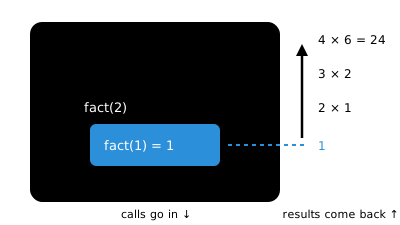
Each node waits on the one below it before it can return anything - factorial(4) can’t produce a value until factorial(3) does, which can’t until factorial(2) does, and so on. Once factorial(0) hits the base case and returns 1, everything unwinds back up the tree, multiplying as it goes: 1 * 1, then 2 * 1, then 3 * 2, then 4 * 6, landing on 24.
Fibonacci’s tree is where this gets more interesting, because it isn’t a straight line - it branches:
fibonacci(4)
├─ fibonacci(3)
│  ├─ fibonacci(2)
│  │  ├─ fibonacci(1) → 1
│  │  └─ fibonacci(0) → 0
│  └─ fibonacci(1) → 1
└─ fibonacci(2)
   ├─ fibonacci(1) → 1
   └─ fibonacci(0) → 0
Notice fibonacci(2) gets computed twice here, completely separately, with no memory of the first time. That’s exactly why the naive version gets so slow - the tree isn’t just deep, it’s got a huge amount of repeated work sitting inside it. Once you can see the tree, the fix (caching results you’ve already computed, usually called memoisation) becomes a lot more obvious than it is from the code alone.
Where you’ve already used one: traversing a tree
If you’ve written a function to walk a nested comment thread, a folder structure, or any tree-shaped data, you’ve reached for recursion whether you called it that or not.
function countNodes(node) {
  if (!node) return 0 // base case

  let count = 1 // count this node
  for (const child of node.children) {
    count += countNodes(child) // recursive case, state shrinks toward the base case
  }

  return count
}
This is the case where recursion genuinely earns its keep over a loop - you don’t know ahead of time how deep the tree goes, so there’s no fixed number of nested loops you could write instead. Each recursive call just deals with “count this node and whatever’s below it,” and trusts the recursive calls underneath it to handle their own subtrees correctly.
Every recursive function needs three things: a base case that stops it, a recursive case that calls itself, and a change of state that moves it toward the base case.
Recursion is the natural fit when a problem is made of smaller instances of itself, or when you need to traverse something with unknown depth, like a tree.
Stack overflow happens when the call stack runs out of room - usually a missing or unreachable base case.
Drawing out the calls as a tree makes it much easier to see what a recursive function is actually doing.
Liked this article? Share it with a friend on Twitter or support me to take on more ambitious projects to write about. Have a question, feedback or simply wish to contact me privately? Shoot me a DM and I'll do my best to get back to you.
Have a wonderful day.

Angelos Ioakeimidis
Data Science & AI Student. Writing about software engineering, design, and AI.