Searching Through an Array
August 25, 2026 · 8 min read · Angelos Ioakeimidis
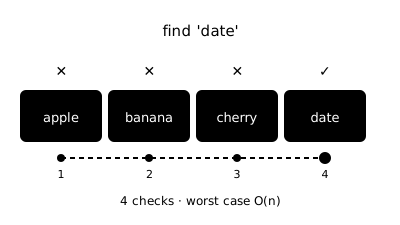
If I handed you an array of a million numbers and asked you to find one specific value, would your approach change depending on whether that array was sorted or not? It absolutely should, and that one distinction is basically the entire story of array searching. Let’s go through every method that matters, from the obvious to the clever.
Linear Search
This is the one everyone reaches for first, because it’s the most intuitive. Start at the beginning, check each element, and stop the moment you find what you’re looking for (or run out of array).
function linearSearch(array, target) {
  for (let i = 0; i < array.length; i++) {
    if (array[i] === target) return i
  }

  return -1
}

linearSearch([12, 4, 99, 8, 45, 3], 45) // 4
linearSearch([12, 4, 99, 8, 45, 3], 100) // -1
Linear search doesn’t care whether your data is sorted or not, it just plods through in order. That flexibility comes at a cost though. In the worst case, meaning the target is the last element or isn’t in the array at all, you end up checking every single item. That makes it O(n), linear time. Best case is O(1) if you get lucky and the target is sitting right at index 0, but you can’t count on luck.
It’s also worth knowing that JavaScript’s built-in array methods like indexOf, includes, and find are all doing a linear search under the hood. They just save you time from writing the loop yourself.
;[12, 4, 99, 8, 45, 3].indexOf(45) // 4, O(n)
;[12, 4, 99, 8, 45, 3].includes(45) // true, O(n)
;[12, 4, 99, 8, 45, 3].find((x) => x === 45) // 45, O(n)
Binary Search
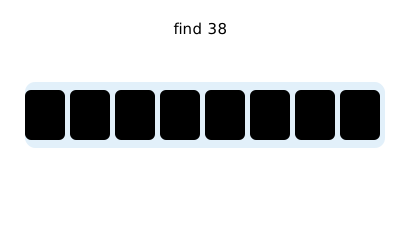
Now here’s where sorted data starts paying off. If your array is already sorted, you don’t need to check every element, you can eliminate half the remaining elements with every single comparison. That’s the whole idea behind binary search: check the middle, and based on whether your target is bigger or smaller, throw away the half that can’t possibly contain it. Watch this example:
function binarySearch(sortedArray, target) {
  let low = 0
  let high = sortedArray.length - 1

  while (low <= high) {
    // O(log n)
    const mid = Math.floor((low + high) / 2)

    if (sortedArray[mid] === target) return mid
    else if (sortedArray[mid] < target) low = mid + 1
    else {
      high = mid - 1
    }
  }

  return -1
}

binarySearch([2, 5, 8, 12, 16, 23, 38, 56], 38) // 6
What happens with an array of, say, a thousand sorted elements. First comparison narrows it down to 500 possibilities. Second comparison narrows it to 250. Third to 125. You’re cutting the search space in half every single step, which is exactly what gives us O(log n), logarithmic time. That’s the whole reason binary search is prized: doubling your input size barely adds any extra work at all.
There’s a recursive version too, if that reads more naturally to you:
function binarySearchRecursive(sortedArray, target, low = 0, high = sortedArray.length - 1) {
  if (low > high) return -1

  const mid = Math.floor((low + high) / 2)

  if (sortedArray[mid] === target) return mid
  else if (sortedArray[mid] < target)
    return binarySearchRecursive(sortedArray, target, mid + 1, high)
  else {
    return binarySearchRecursive(sortedArray, target, low, mid - 1)
  }
}

binarySearchRecursive([2, 5, 8, 12, 16, 23, 38, 45, 56, 72], 56) // 8
The catch, and it’s a real one, is that binary search only works on sorted data. If your array isn’t sorted, you’d have to sort it first, and sorting itself typically costs O(n log n). So binary search is an amazing deal if you’re searching the same sorted array repeatedly, but not worth the setup cost for a single one-off search on unsorted data.
Jump Search
Somewhere in between linear and binary sits jump search, a neat trick for sorted arrays when you want something simpler than binary search but faster than checking every element.
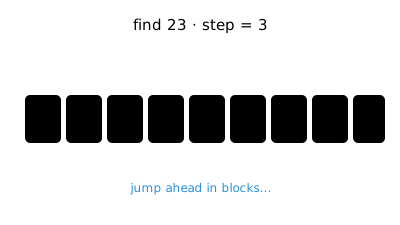
The idea is to jump ahead in fixed-size blocks instead of checking one element at a time, until you find a block that could contain your target, then do a linear search within just that block.
function jumpSearch(sortedArray, target) {
  const length = sortedArray.length
  const jump = Math.floor(Math.sqrt(length)) // block size
  let step = jump
  let prev = 0

  while (sortedArray[Math.min(step, length) - 1] < target) {
    // O(sqrt(n))
    prev = step
    step += jump
    if (prev >= length) return -1
  }

  while (sortedArray[prev] < target) {
    // O(sqrt(n)) within the block
    prev++
    if (prev === Math.min(step, length)) return -1
  }

  return sortedArray[prev] === target ? prev : -1
}

jumpSearch([2, 5, 8, 12, 23, 31, 45, 56, 64], 23) // 4
The optimal block size turns out to be the square root of the array length, which gives jump search a runtime of O(√n). That lands it right between linear search and binary search on the speed spectrum. It’s not something you’ll reach for often, binary search usually wins when your data structure allows random access, but it’s a handy option when jumping backward is expensive (like with certain data on disk) and you’d rather move forward in predictable strides.
Interpolation Search
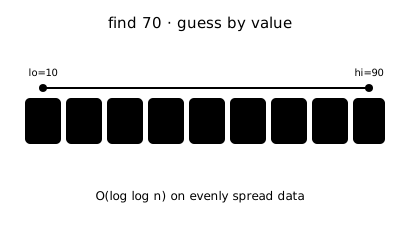
This one’s a smarter cousin of binary search, useful when your sorted data is also roughly uniformly distributed, like a sorted list of evenly spaced numbers. Instead of always checking the middle, it makes an educated guess about where the target probably is, based on its value.
function interpolationSearch(sortedArray, target) {
  let low = 0
  let high = sortedArray.length - 1

  while (low <= high && target >= sortedArray[low] && target <= sortedArray[high]) {
    if (low === high) return sortedArray[low] === target ? low : -1

    const pos =
      low +
      Math.floor(
        ((target - sortedArray[low]) * (high - low)) / (sortedArray[high] - sortedArray[low]),
      )

    if (sortedArray[pos] === target) return pos
    else if (sortedArray[pos] < target) low = pos + 1
    else {
      high = pos - 1
    }
  }

  return -1
}

interpolationSearch([10, 20, 30, 40, 50, 55, 70, 90], 70) // 6
Think of it like flipping through a phone book (if you remember those). You don’t start in the middle looking for “Zimmerman”, you jump straight forward towards the back, because you can estimate roughly where it’ll be. On uniformly distributed data, that estimation gives interpolation search an average time of O(log log n), even better than binary search. But the worst case, when the data is unevenly distributed, degrades all the way to O(n). So it’s a specialist tool, brilliant in the right conditions, not something to reach for by default.
Hash-Based Lookup
Technically not a search “through” an array in the traditional sense, but it’s worth mentioning because it changes the whole conversation. If you know ahead of time that you’ll be searching for values repeatedly, you can trade some upfront memory for dramatically faster lookups by building a hash-based lookup (in JavaScript, a Set) from your array first.
const numbers = [12, 4, 99, 8, 45, 3]
const lookup = new Set(numbers) // O(n) to build, once

lookup.has(45) // true, O(1)
lookup.has(100) // false, O(1)
Building the Set costs O(n) upfront, but after that, every single lookup is O(1), constant time, regardless of array size. If you’re only searching once, this isn’t worth the setup. But if you’re searching the same collection over and over, this is usually the smartest move on the table.
Putting It All Together
So which one should you actually reach for? Here’s how I think about it:
| Situation | Reach for |
|---|---|
| Unsorted data, searching once | Linear search - you don't have a better option. |
| Sorted data, searching once | Linear search still wins - sorting first just to binary search once isn't worth the cost. |
| Sorted data, searching repeatedly |
Binary search -
O(log n)
per lookup is hard to beat.
|
| Sorted, uniformly distributed data | Interpolation search - if you want to squeeze out even more speed. |
| Searching the same collection over and over, sorted or not |
Build a hash-based lookup once, then enjoy
O(1)
searches from then on.
|
Isn’t it kind of reassuring that “just loop through it” is actually the right answer sometimes? Not every problem needs the clever solution. But now that you’ve got the full toolkit, you get to make the choice on purpose instead of by default.
Linear search is O(n) no matter the syntax - loop, indexOf, includes, and find all scan one by one.
Binary search hits O(log n), but only on sorted data - each comparison rules out half what's left.
Sorting costs O(n log n) upfront - only worth it if you're searching the same data repeatedly.
Searching the same collection over and over? A Set turns an O(n) search into an O(1) lookup.
Liked this article? Share it with a friend on Twitter or support me to take on more ambitious projects to write about. Have a question, feedback or simply wish to contact me privately? Shoot me a DM and I'll do my best to get back to you.
Have a wonderful day.

Angelos Ioakeimidis
Data Science & AI Student. Writing about software engineering, design, and AI.