Stack
September 8, 2026 · 6 min read · Angelos Ioakeimidis
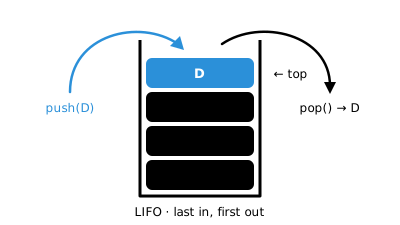
I’ve been going back over the basics lately, mostly because I keep tripping over gaps I didn’t know I had. Stacks were one of those “oh, I already know this, I just didn’t know I knew it” moments. Once it clicked, I started noticing stacks everywhere in stuff I build almost every week.
So here’s my attempt at explaining what a stack is, why it matters, and where you’ve probably already used one without calling it that.
What a stack even is
A stack is just a list where you can only do two things: put something on top, or take the thing off the top. That’s it. You can’t reach into the middle and grab an item, and you definitely can’t grab the bottom one first.
The technical term for this is LIFO - Last In, First Out. The last item you added is the first one that comes back out.
I think of it like a stack of plates at a buffet. You take from the top. You add to the top. Nobody’s pulling a plate out from the bottom of the stack unless they want a mess on the floor.
The two operations you actually need
Every stack, no matter the language, comes down to two moves:
- push - add something to the top
- pop - remove whatever’s on top and hand it back to you
Some implementations throw in a peek too, which just lets you look at the top item without removing it. Handy when you want to check what’s there before deciding what to do next.
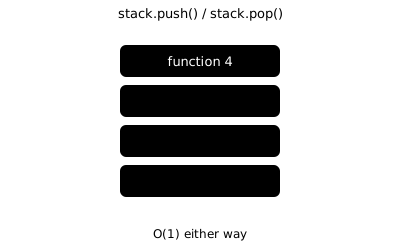
Here’s a stack in plain JavaScript, built on top of an array:
class Stack {
  #items = [] // #items is only accessible from inside the Stack class itself

  push(item) {
    this.#items.push(item)
  }

  pop() {
    return this.#items.pop()
  }

  peek() {
    return this.#items.at(-1)
  }

  isEmpty() {
    return this.#items.length === 0
  }

  get size() {
    return this.#items.length
  }
}
I used a private field there (#items) mostly out of habit - I don’t want anything outside the class messing with the array directly and breaking the LIFO rule. If people can reach in and snatch an item from the middle, it’s not really a stack anymore, it’s just an array pretending.
Where you’ve already used one: undo
This is the example that made it all click for me. Think about any app with an undo button - a text editor, a drawing tool, even the little “undo” toast that shows up when you accidentally archive an email.
Every time you do something undoable, the app pushes that action onto a stack. Hit undo, and it pops the most recent one off and reverses it. Hit undo again, it pops the next most recent. You’re always undoing your last move first, which is exactly the behaviour LIFO gives you for free.
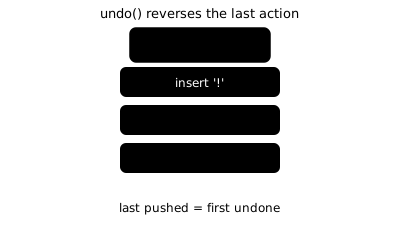
An under-the-hood version might look like this:
const undoStack = new Stack()

function typeCharacter(char, document) {
  undoStack.push({ type: 'insert', char, position: document.length })
  document += char
  return document
}

function undo(document) {
  if (undoStack.isEmpty()) return document

  const lastAction = undoStack.pop()
  if (lastAction.type === 'insert') {
    document = document.slice(0, lastAction.position)
  }

  return document
}
A real text editor’s undo system is way more involved than this - you’d want redo, batching, maybe a max history size so you’re not holding onto every single keystroke forever. But the core idea doesn’t change: push when something happens, pop when you want to reverse it.
Your browser is doing the same thing
Ever notice how hitting “back” always takes you to the page you were just on, not some random page from an hour ago? That’s a stack too. Every page you visit gets pushed onto a history stack. Hit back and the browser pops the current page off and shows you what’s underneath.
This is also why “forward” only works right after you’ve gone “back” - going forward is basically its own little stack that gets cleared the moment you visit a brand new page instead of pressing forward.
The one that’s running right now, without you asking for it
Here’s the one that genuinely surprised me: your code is using a stack constantly, whether you think about it or not. It’s called the call stack, and it’s how JavaScript (and pretty much every language) keeps track of which function called which.
function greet(name) {
  return `Hey, ${name}`
}

function greetLoudly(name) {
  return greet(name).toUpperCase()
}

greetLoudly('Angelos')
When greetLoudly runs, it gets pushed onto the call stack. Then it calls greet, which gets pushed on top of that. Once greet finishes and returns its value, it pops off, and control goes back to greetLoudly right where it left off. Then that pops off too, once it’s done.
If you’ve ever seen “Maximum call stack size exceeded” in your console, congratulations, you’ve met the call stack the hard way. That error usually means you’ve got a function calling itself (directly or indirectly) with no way to stop, so the stack just keeps growing until it runs out of room.
function countdown(n) {
  console.log(n)
  countdown(n - 1) // no base case - this never stops
}
That’ll blow up almost instantly. A base case, something that tells the function when to stop calling itself, is what keeps a recursive function from becoming an accidental stack overflow.
Stack vs Queue, quickly
People mix these two up a lot, so it’s worth a quick side by side. A stack is LIFO, last in first out. A queue is FIFO, first in first out - like a line at a shop, first person in line gets served first.
If you’re modelling: “undo my last action” or “unwind function calls in reverse order”, reach for a stack. If you’re modelling: “process things in the order they arrived”, like a print queue or a task list that runs in sequence, that’s a queue’s job instead.
Why bother learning this
Honestly, I don’t think I’ll be hand-rolling a Stack class in most day-to-day work - JavaScript arrays already cover it, and most languages have something built in. But recognising the pattern is what’s useful. Once you know what a stack looks like, you start spotting it in places you wouldn’t expect.
It’s one of those ideas that’s small enough to learn in an afternoon but shows up for the rest of your career.
Want to go deeper on queues?
FIFO order, enqueue/dequeue, and where queues show up in real apps like task runners and message processing.
A stack only allows two moves: push (add to top) and pop (remove from top) - LIFO, last in first out.
Undo features work by pushing every action onto a stack, then popping the most recent one off to reverse it.
Browser back/forward buttons are just page history stacks.
The JS call stack tracks function calls; a "Maximum call stack size exceeded" error means a recursive function has no base case.
Stacks vs queues: use a stack for reversing order (undo, recursion), a queue for processing things in arrival order.
Liked this article? Share it with a friend on Twitter or support me to take on more ambitious projects to write about. Have a question, feedback or simply wish to contact me privately? Shoot me a DM and I'll do my best to get back to you.
Have a wonderful day.

Angelos Ioakeimidis
Data Science & AI Student. Writing about software engineering, design, and AI.