Arrays
August 21, 2026 · 7 min read · Angelos Ioakeimidis
What Is an Array, Really?
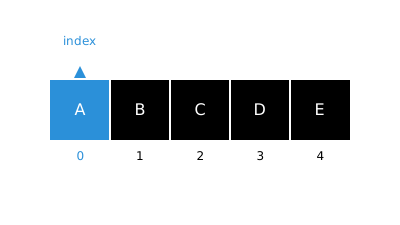
An array is simply an ordered collection of elements, stored so that each one can be accessed directly by its position, or index. Think of it like a row of numbered lockers. If you know the locker number, you can walk straight to it, no searching required. That’s the whole superpower of arrays: because elements sit at predictable positions, you can jump straight to any one of them without checking everything that comes before it.
const fruits = ['apple', 'banana', 'cherry', 'date']

console.log(fruits[0]) // 'apple'
console.log(fruits[2]) // 'cherry'
Grabbing fruits[2] doesn’t require peeking at fruits[0] or fruits[1] first. It’s a direct hop to that locker. That’s why accessing an array by index is O(1), constant time regardless of whether the array holds 4 items or 4 million.
Searching Through an Array
Here’s where things slow down a bit. If you know the index you want, great, that’s instant. But what if you only know the value you’re looking for, and have no idea where it lives?
function contains(array, target) {
  for (let i = 0; i < array.length; i++) {
    // O(n)
    if (array[i] === target) {
      return true
    }
  }

  return false
}

contains(['apple', 'banana', 'cherry', 'date'], 'date') // true
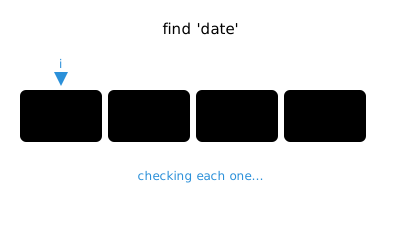
Since you don’t know where the value is, the only honest approach is to check elements one by one until you find it, or run out of array. In the worst case, meaning the value is the very last element or isn’t there at all, you end up checking every single item. That makes searching O(n) or in other words linear time. Doesn’t matter if you use a manual loop above or reach for a built-in like indexOf or includes, they’re all doing the same linear scan under the hood.
;['apple', 'banana', 'cherry', 'date'].includes('cherry') // O(n)
;['apple', 'banana', 'cherry', 'date'].indexOf('cherry') // O(n)
The only way around this is if your array happens to already be sorted, in which case something like binary search can get you down to O(log n). But that’s a strategy for sorted data specifically, not something a plain unsorted array gives you for free.
Adding and Removing at the End
This is the array’s happy path. JavaScript arrays keep track of their own length, so adding or removing from the end doesn’t require touching any other element at all.
const fruits = ['apple', 'banana', 'cherry']

fruits.push('date') // O(1)
console.log(fruits) // ['apple', 'banana', 'cherry', 'date']

fruits.pop()
console.log(fruits) // ['apple', 'banana', 'cherry']
push just drops the new element into the next open slot, and pop just removes the last one. No shifting, no renumbering, nothing else in the array even notices it happened. That’s why both of these run in O(1) in other words constant time. If you’re going to be doing a lot of adding and removing, the end of the array is genuinely the cheapest place to do it.
Adding and Removing at the Start
Now here’s where it gets more expensive, and honestly this tripped me up the first time I really thought it through. You’d think adding something to the front of an array would be quick, right? It’s not.
const fruits = ['banana', 'cherry', 'date']

fruits.unshift('apple') // O(n)
console.log(fruits) // ['apple', 'banana', 'cherry', 'date']

fruits.shift() // O(n)
console.log(fruits) // ['banana', 'cherry', 'date']
Why does shift cost a lot? Because every existing element’s index has to change. If you unshift('apple') onto ['banana', 'cherry', 'date'], 'banana' can’t stay at index 0 anymore, it has to move to index 1. 'cherry' moves to index 2. 'date' moves to index 3. Every single element gets bumped over to make room for the new one at the front. The same thing happens in reverse with shift, everything after the removed element has to slide back down by one.
So even though it feels like a small operation, “just add one thing to the front”, the engine has to touch every other element to keep the indexing consistent. That’s O(n), linear time, not the constant time you might assume. If your code does a lot of front-insertion, that’s actually a sign a different data structure (like a linked list, or a deque) might serve you better.
Adding and Removing in the Middle
Right in between those two extremes sits inserting or removing somewhere in the middle of the array, and it behaves a lot like the front-of-array case.
const fruits = ['apple', 'banana', 'date']

fruits.splice(2, 0, 'cherry') // O(n)
console.log(fruits) // ['apple', 'banana', 'cherry', 'date']

fruits.splice(2, 1) // O(n)
console.log(fruits) // ['apple', 'banana', 'date']
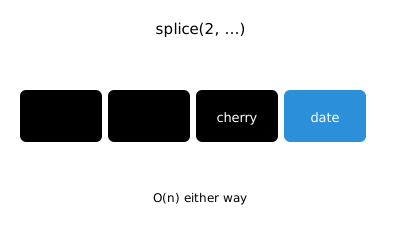
Inserting 'cherry' at index 2 means everything from that point onward, in this case just 'date', has to shift over to make room. Removing it later means everything after that point has to shift back to fill the gap. The number of elements that need to move depends on how close to the front you’re inserting or removing. Closer to the front means more shifting, closer to the end means less. But since the worst case still involves shifting a good chunk of the array, we classify middle insertion and removal as O(n) as well.
Putting It All Together
Here’s the cheat sheet I keep in my head whenever I’m deciding how to manipulate an array:
| Operation | Cost |
|---|---|
| Access by index |
O(1)
- you go straight to the locker.
|
| Search by value |
O(n)
- you have to check one by one until you find it.
|
| Add or remove at the end |
O(1)
- nothing else needs to move.
|
| Add or remove at the start |
O(n)
- everything has to shift over by one.
|
| Add or remove in the middle |
O(n)
- everything after the insertion or removal point has to shift.
|
Isn’t it kind of satisfying once you see the pattern? Anything that keeps every other element exactly where it already was stays cheap. Anything that forces the rest of the array to renumber itself gets expensive. Once that idea clicks, you start writing code that reaches for push and pop by instinct, and thinks before reaching for unshift in a hot loop.
Want to go deeper on searching?
Linear scans are just the start - binary, jump, and interpolation search can get you down to O(log n) or better.
Index access is O(1) - you go straight to the slot. Searching by value is O(n) - you check one by one.
push and pop are O(1) - nothing else in the array has to move.
unshift, shift, and mid-array splice are O(n) - everything after the point has to shift over.
The rule: operations that leave other elements in place stay cheap, operations that force renumbering get expensive.
Liked this article? Share it with a friend on Twitter or support me to take on more ambitious projects to write about. Have a question, feedback or simply wish to contact me privately? Shoot me a DM and I'll do my best to get back to you.
Have a wonderful day.

Angelos Ioakeimidis
Data Science & AI Student. Writing about software engineering, design, and AI.